
You can now run a full ICTFax server with a single command. Official images are published to Docker Hub and GitHub Container Registry, rebuilt from source on every commit, and they carry the whole stack: Rocky Linux 8, FreeSWITCH 1.10.12 with T.38, PHP, MariaDB, the fax toolchain and the web dashboard.
docker run -d --name ictfax \
  -p 8080:80 -p 8443:443 \
  -p 5060:5060/udp -p 5060:5060/tcp \
  -p 16384-16484:16384-16484/udp \
  ictinnovations/ictfax:latest
Give it a minute or two. The container provisions its database, loads the schema, generates a TLS certificate and starts FreeSWITCH before the dashboard comes up on http://localhost:8080/. Sign in with admin@ictcore.org and helloAdmin, then change it.
Why this took a while
ICTFax has always been installable. The installation guide works, and plenty of people have followed it. What it asks of you is a couple of hours and a willingness to debug somebody else’s repository setup on a machine you have not decided to keep yet.
That is a bad first impression for a project you are only evaluating. Most people who want to know whether an open source fax server suits them want to send one fax and look at the result. Making that a two hour commitment loses the ones who would have stayed.
So the image exists to shorten the distance between curiosity and a working fax. It is not a replacement for a considered production install, though it is close enough that some people will run it in production anyway, and we have built it so that is a reasonable thing to do.
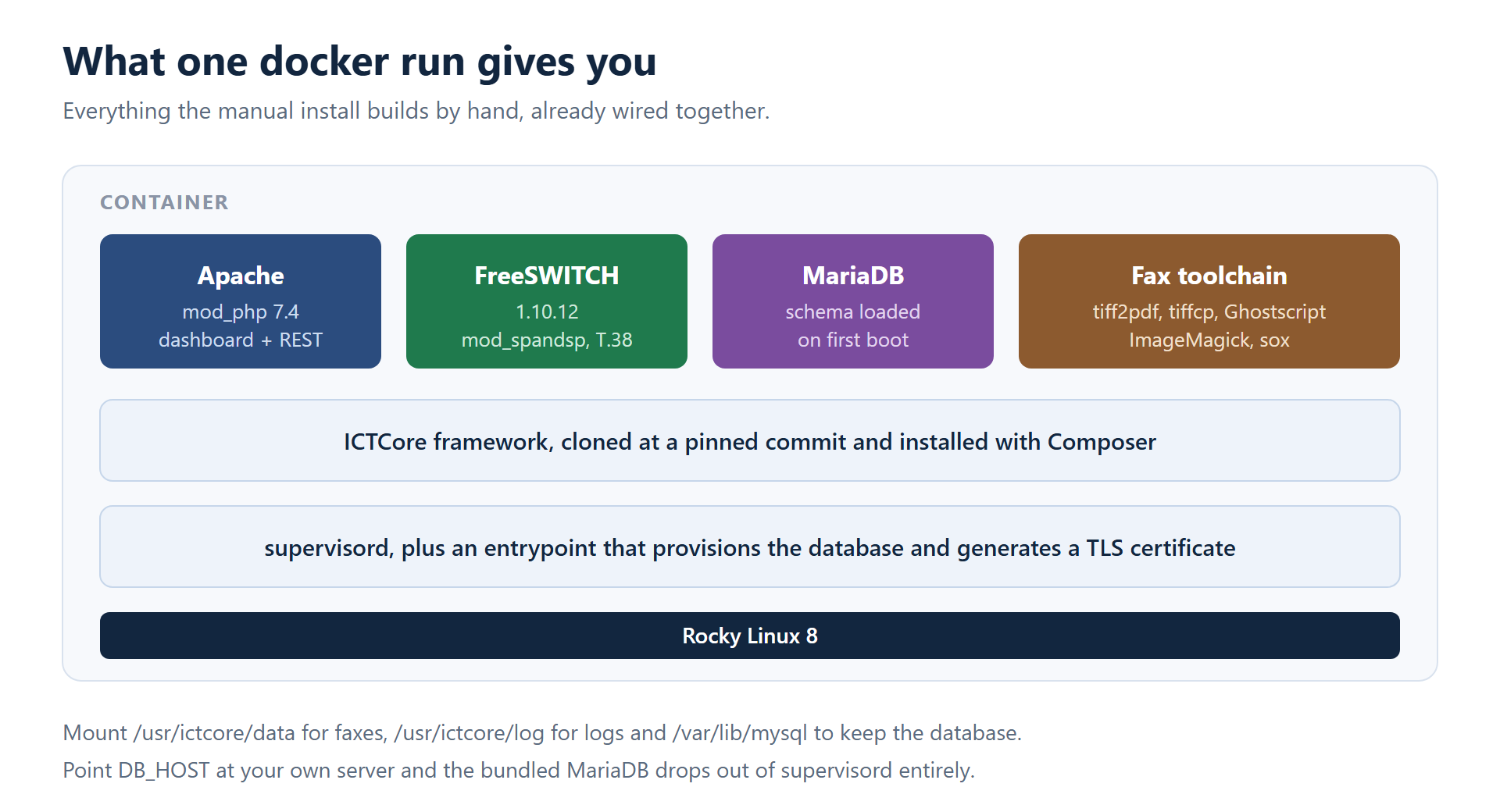
What is inside
The interesting parts are the ones you would otherwise assemble by hand.
- FreeSWITCH 1.10.12 with
mod_spandsp, so T.38 and G.711 fax both work out of the box. The packages come from Fedora Copr, which is HTTPS and GPG signed, rather than from a mirror whose signing key nobody publishes. - The fax toolchain.
tiff2pdf,tiffcp, Ghostscript, ImageMagick and sox. ICTFax shells out to these for document conversion, and on a bare Rocky 8 box half of them live in a repository that ships disabled. - MariaDB, provisioned on first boot. Point
DB_HOSTat your own server and the bundled one drops out of supervisord completely, so you are not paying for a database you do not use. - A TLS certificate generated at runtime. Baking a private key into a public image would hand every user the same key, so the entrypoint makes one on first start.
Useful environment variables: ICTCORE_HOST for the hostname the dashboard advertises, the DB_* set for an external database, and FS_ESL_PASSWORD for the FreeSWITCH event socket. Worth mounting: /usr/ictcore/data for received faxes, /usr/ictcore/log, and /var/lib/mysql if you keep the bundled database.
The build tests itself
Every push runs the image through a smoke test before anything reaches a registry. The container has to boot, the dashboard has to answer, Angular deep links have to resolve, the REST API has to respond without a PHP fatal, mod_spandsp has to be loaded in FreeSWITCH, and the schema has to be present in the database. Any failure stops the run before the publish step.
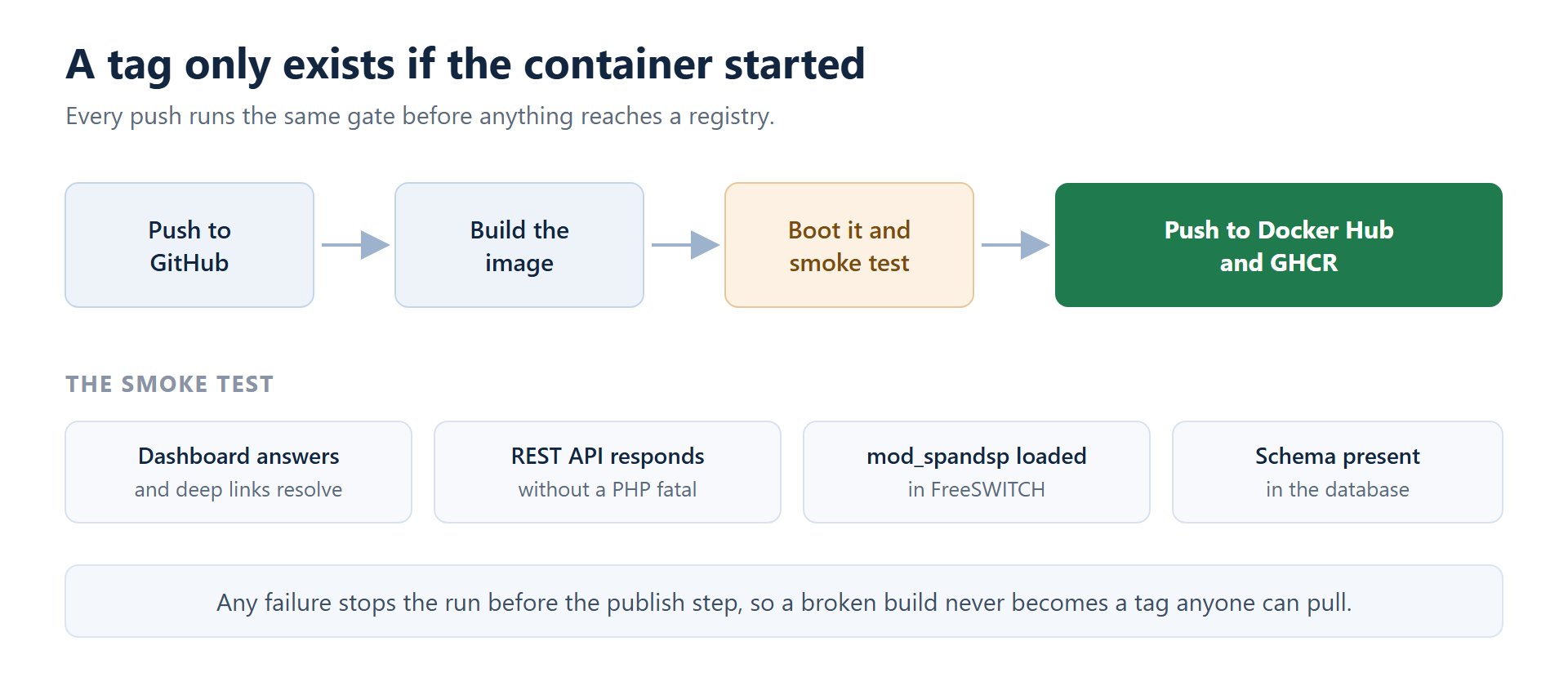
That gate turned out to be worth more than the image. Building it meant running a clean ICTFax install on a fresh machine over and over, which is something almost nobody does, and it surfaced four real bugs in the first-install path. Invalid DEFAULT clauses in one of the schema files, a trigger that got created twice, seed files loading in the wrong order, and a database connection string that glued the host and port together in a way the mysqli extension has never accepted.
All four are fixed upstream in ICTCore, so they are fixed for people installing from packages too, not just for container users. That is the part we did not expect and the reason the test gate stays.
Where the images live
Both registries carry the same build:
docker pull ictinnovations/ictfax:latestfrom Docker Hubdocker pull ghcr.io/ictinnovations/ictfax:latestfrom GitHub Container Registry
Two sibling images went out at the same time. ictinnovations/ictcore is the framework on its own, useful if you are building against the REST API and do not need a fax dashboard. ictinnovations/ictdialer is the voice and fax broadcasting product on the same stack.
What we would still do by hand
Media matters more than signalling with fax. Publish the RTP range, or you will get a call that connects and a fax that never completes, which is the classic first run complaint and looks like a software fault when it is a port mapping.
SIP trunk configuration is still yours. The image gives you a working FreeSWITCH, not a working carrier relationship, and T.38 negotiation with a given provider is the part that takes the afternoon. The technologies page covers what ICTFax expects from a trunk.
And if you are running this for real, put a reverse proxy with a certificate you trust in front of it rather than relying on the self-signed one the entrypoint generates.
Frequently asked questions
Does this replace the manual installation?
No. The installation guide is still the right path if you want ICTFax on a host you already run and manage with your own tooling. The image is the fastest way to get a working system to look at.
Can I use my own database?
Yes. Set DB_HOST, DB_PORT, DB_NAME, DB_USER and DB_PASS. The bundled MariaDB is removed from supervisord automatically when DB_HOST points somewhere else.
Which ports do I need to publish?
80 and 443 for the dashboard and REST API, 5060 on TCP and UDP for SIP, and the 16384 to 16484 UDP range for media. Skipping the media range is the most common reason a first fax fails.
Is T.38 supported?
Yes. mod_spandsp ships in the image and the build refuses to publish if it is not loaded. G.711 pass-through faxing works as well.
How do I persist faxes across restarts?
Mount /usr/ictcore/data. Add /var/lib/mysql if you are using the bundled database and /usr/ictcore/log if you want logs on the host.
Is the image free to use?
Yes. ICTFax is open source under GPL-3.0 and the images carry no additional restrictions. Professional support is available separately if you want it.
Try it and tell us what breaks
The images are new. They pass their own tests on a clean runner, which is not the same as working on every network anyone will point them at. If you hit something, the support page has the places to raise it, and a bug report from a container is easier for us to reproduce than one from a bespoke install.
Where the image comes from
The Docker image is built from the same source as everything else here. The application is ICTFax on GitHub, GPL-3.0, and the fax and call handling inside the container comes from ICTCore, the FreeSWITCH based framework it runs on. If the container does something you did not expect, the Dockerfile in the repository is the fastest way to see what it actually sets up, and the issue tracker there is where fixes get made. The Docker Hub page lists the tags.