The UK’s old analogue phone network closes on 31 January 2027, and Openreach says about a million copper lines still haven’t moved, 300,000 of them in business premises. Many of those lines carry a fax machine nobody has thought about in years. If one of them is yours, you have about eleven weeks to decide what happens to it.
This isn’t a deadline that’s likely to slip. Openreach describes 31 January as the permanent decommissioning of the network, and its latest warning on 30 October was blunt. Here’s what’s actually changing, what happens to a fax line that hasn’t moved, and the options that keep faxes flowing after the switch-off.
What Openreach has said this autumn
On 30 October 2026, Openreach warned that fewer than 100 days were left before the Public Switched Telephone Network (PSTN) is retired. It put the number of copper-based lines still in use at about one million across the UK, including 300,000 in business premises. A month earlier, on 24 September, the figures were around 1.2 million lines and 350,000 businesses, so lines are moving, but not quickly enough to clear the backlog by January.
The October release lists the kinds of systems still sitting on these lines: payment terminals, lift emergency phones, auto-diallers, fire alarm panels, security monitoring, door entry units and industrial telemetry. Openreach’s September announcement named fax services directly, alongside telecare devices and lift alarms, as things customers may not realise depend on the old network.
James Lilley, Openreach’s Director of All-IP, put the problem plainly: “Businesses and organisations that delay action are making things harder for themselves. The straightforward migrations have largely been completed.” The lines that are left are the awkward ones, and a forgotten fax line in a back office is a classic example.
What happens to a fax line that hasn’t moved
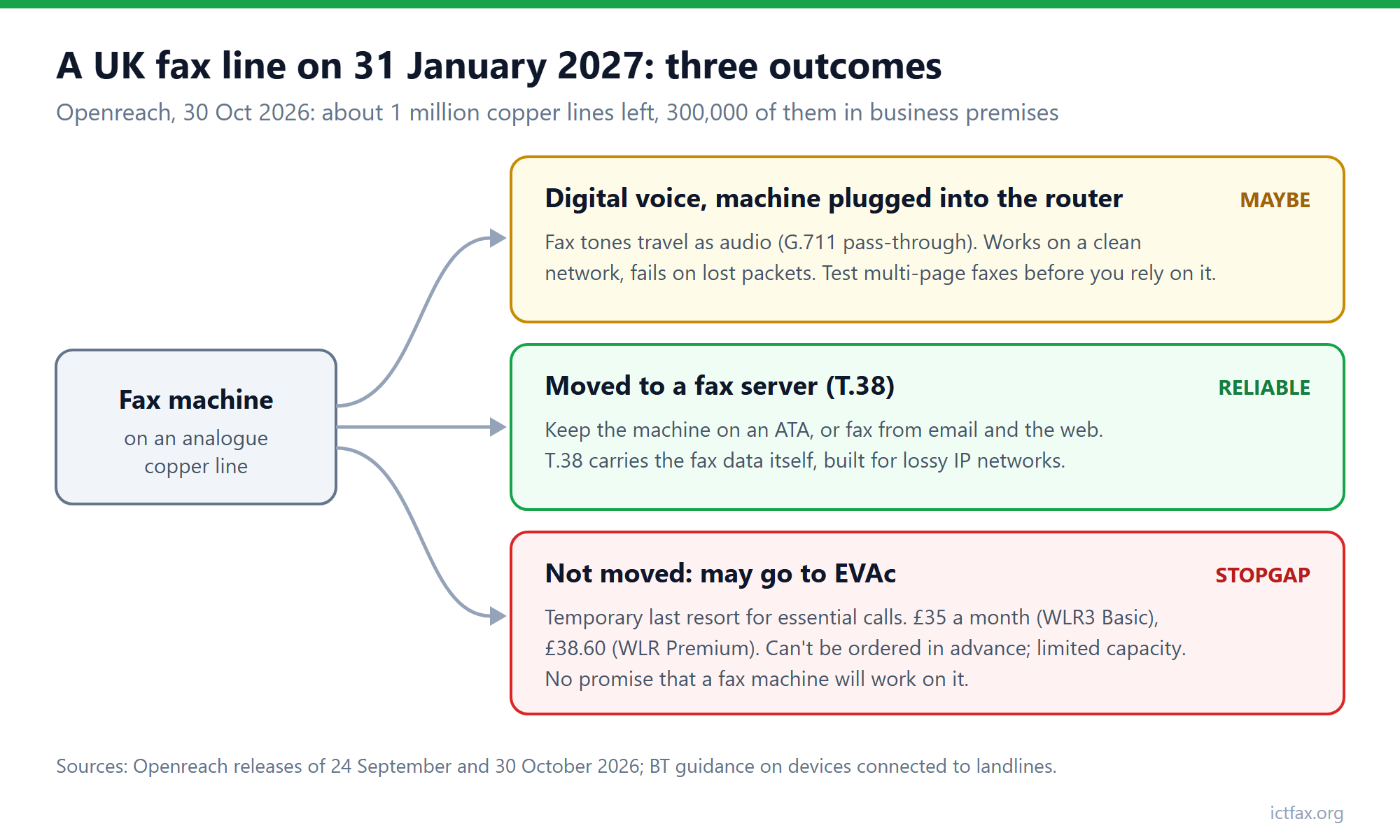
A line that’s still on the old network after 31 January may be moved onto Openreach’s Emergency Voice Access Continuity service, known as EVAc. It’s a last-resort service, and the details matter if you’re thinking of leaning on it:
- It’s temporary. Openreach describes it as a temporary, limited service, not a new home for your line.
- It costs more. The September announcement priced it at £35 a month for a WLR3 Basic line and £38.60 for WLR Premium, and Openreach calls it significantly more expensive than modern digital alternatives.
- You can’t book it. It can’t be ordered in advance, and capacity is limited.
- It’s built for essential calls. Openreach says it maintains access to essential calls. Nothing in its announcements promises that a fax machine will keep working on it, so don’t plan around that.
Openreach has also said it will keep linked broadband running when a line moves to EVAc, where that’s technically possible. That’s good news for the broadband, but it does nothing for the fax.
Will your fax machine work on a digital line?
Sometimes. That’s the honest answer, and it’s the reason to test before you rely on it.
When your provider moves you to a digital voice service, the line becomes a voice over IP call behind a router. A fax machine plugged into that router’s phone port sends its tones as audio. That’s called G.711 pass-through, and it works when the network is clean and fails when packets go missing or the audio is compressed. BT’s own guidance tells customers with devices on their landline to check with the manufacturer that the device will still work on a digital line, and to replace it if it won’t.
The protocol built for this problem is T.38, which carries the fax data itself rather than the sound of it. We explain the difference in why faxes fail over VoIP and how T.38 fixes it. The short version: if fax matters to your business, you want a path that speaks T.38 end to end, not a hope that pass-through survives.
Three ways to keep faxing after the switch-off
1. Move to digital voice and test the fax. If you send a handful of faxes a month, this may be enough. Before your number moves, send a five-page fax through the new line to a machine you control and back again. One clean page proves very little; a multi-page fax at a busy time of day tells you much more.
2. Keep the machine, change what it talks to. Plug the fax machine into an analogue telephone adapter (ATA) and point it at a fax server that speaks T.38, rather than at a voice line. Staff keep using the same machine and the same habits. ICTFax supports this setup; our guide to faxing from a fax machine through an ATA walks through it.
3. Retire the machine and fax from email or the web. A fax server can send a fax from an email or a browser and deliver incoming faxes to an inbox as PDFs. Your fax number moves to a SIP trunk, and nothing plugs into the wall at all. ICTFax is an open source fax server that does email to fax and fax to email, and you can run it on your own server, so the documents stay with you.
A five-step checklist for the next eleven weeks
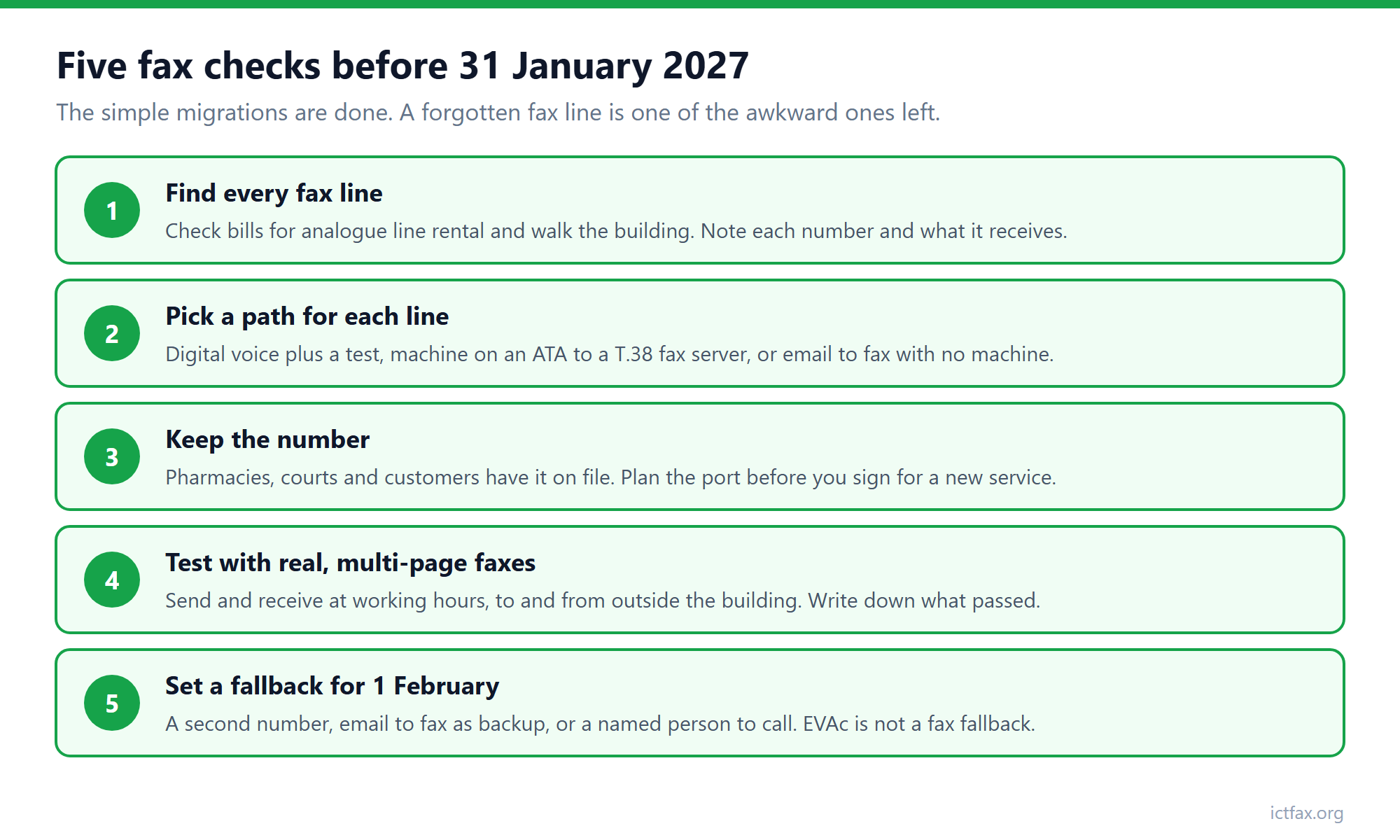
- Find every fax line. Check phone bills for line rental on old analogue products, and walk the building. Fax machines hide in pharmacies, solicitors’ back offices, warehouses and plant rooms. Note each number and what it’s used for.
- Decide the path for each one. Digital voice with a test, a fax machine on an ATA to a T.38 server, or email to fax. A line that receives prescriptions or legal documents deserves more care than one that gets a supplier’s price list twice a year.
- Keep the number. Customers, pharmacies and courts have your fax number on file. Ask your provider how the number moves before you agree to anything, and make porting it to the new service part of the plan.
- Test with real documents. Send and receive multi-page faxes at a normal working hour, to and from someone outside your organisation. Keep a note of what you tested and when.
- Set a fallback. Decide what staff do if a fax fails on 1 February: a second number, email to fax as a backup, or a named person to call. EVAc isn’t a fallback for fax.
Your provider should contact you before your line moves. BT says it contacts customers at least four weeks before a switch to Digital Voice. Don’t wait for that letter if you already know there’s a fax machine on the line; the remaining migrations are the complicated ones, and engineers’ diaries fill up as the deadline gets close.
If you’re starting from scratch, have a look at what ICTFax does: it’s open source, it runs on your own server, and it handles T.38, ATAs, email to fax and fax to email in one system.
Frequently asked questions
When does the UK analogue phone network switch off?
The PSTN closes on 31 January 2027. Openreach calls it a permanent decommissioning. On 30 October 2026 it said about one million copper lines were still in use, including 300,000 in business premises.
Will my fax machine stop working on 31 January 2027?
If it’s still on an analogue line that hasn’t moved, it’s at risk. A line left on the old network may be moved to EVAc, Openreach’s temporary last-resort service for essential calls, and nothing in its announcements promises that fax will work on it.
Does fax work on BT Digital Voice?
It can, but it isn’t guaranteed. A fax machine plugged into a digital voice router sends its tones as audio, which can break on a busy or lossy network. BT tells customers to check with the device maker and test. A fax server that uses T.38 is the more reliable route.
What is EVAc and how much does it cost?
Emergency Voice Access Continuity is Openreach’s temporary service for lines that haven’t moved by the deadline. Openreach priced it at £35 a month for WLR3 Basic and £38.60 for WLR Premium, it can’t be ordered in advance, and capacity is limited.
Can I keep my fax number after the switch-off?
Usually, yes, if you plan it. Ask your provider how the number will move before you agree to a new service, and make porting it to the new line or fax server part of the change.
Is there an open source fax server I can run myself?
Yes. ICTFax is an open source fax server that supports T.38, fax machines connected through ATAs, email to fax and fax to email, and you can install it on your own server.