
Short version: a critical flaw in cPanel and WHM, tracked as CVE-2026-41940, lets an unauthenticated attacker become root by sending one malformed header. Around 1.5 million instances were exposed when it went public. If you run open source fax server software on a box that also runs the hosting panel, that flaw reaches your fax spool without needing a second exploit.
That last sentence is the part most write-ups skip. Plenty of coverage explains the bypass. Very little of it asks the follow-up question a fax operator cares about, which is what an attacker actually walks away with once they are root on your server.
What actually broke
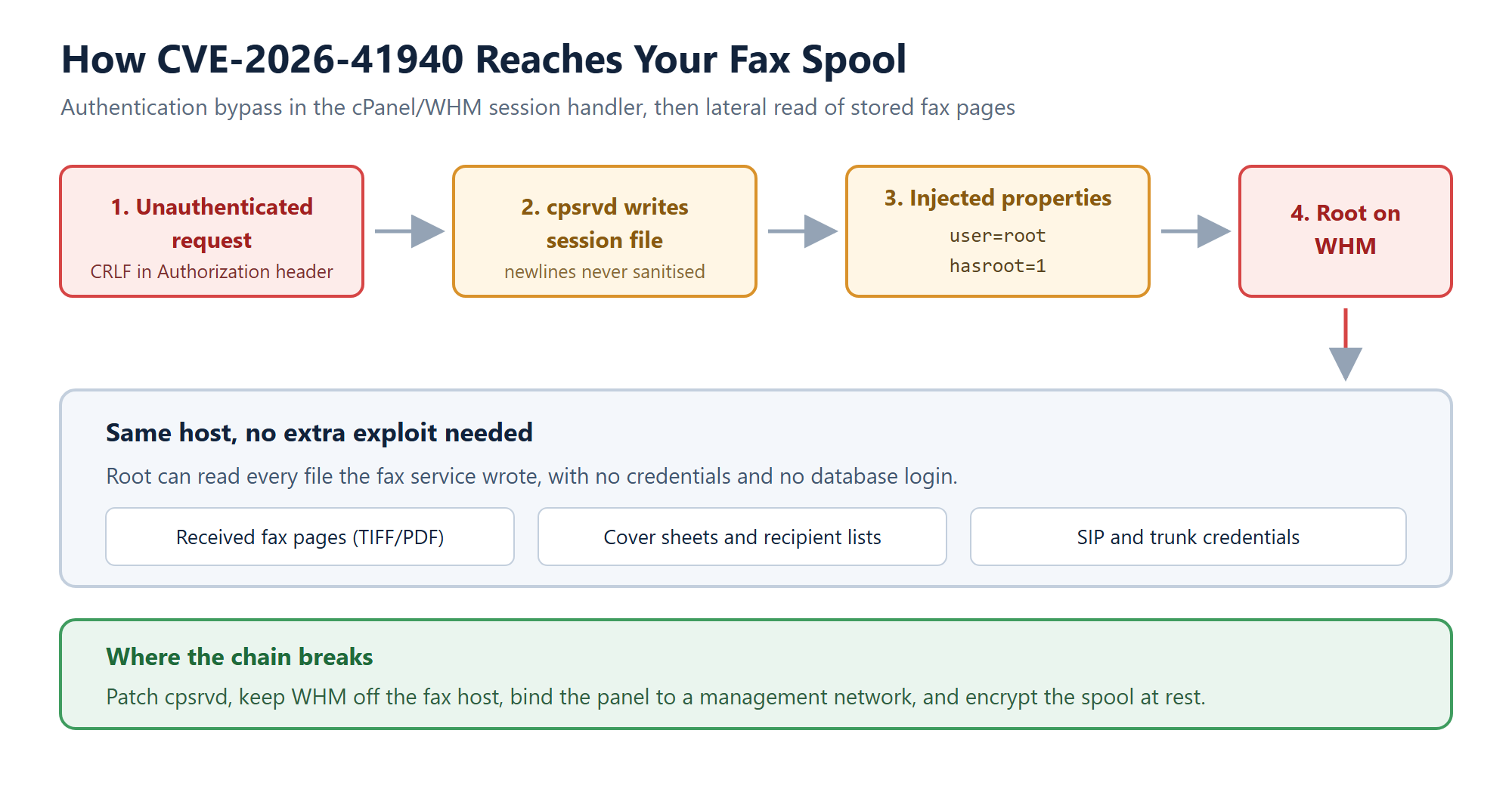
The bug sits in cpsrvd, the daemon behind the cPanel and WHM login. Its basic authentication handler took the value from the HTTP Authorization header and wrote it into a session file without stripping carriage returns and newlines. Raw \r\n characters in a header therefore became new lines in the session file.
Once you can write new lines into a session file, you can write new properties into it. Attackers inserted user=root and hasroot=1, tampered with the whostmgrsession cookie so the per-session encryption step got skipped, then reloaded the session. The server read its own file back and concluded the visitor was an authenticated administrator.
No credentials. No user interaction. Network reachable. It scored 9.8 on CVSS, which is about as high as these things go, and honestly the score feels earned rather than inflated for once.
Why this hits open source fax server software harder than most apps
A compromised web app usually leaks whatever that app can reach. A fax server is different, because of what it leaves lying around on disk.
Every received fax gets written as an image file before anything else happens to it. Cover sheets, recipient lists and job metadata sit alongside it. Trunk credentials live in configuration files the service has to read at startup. None of that is protected by an application login, so root does not need to guess a password or open a database. Root just reads files.
For a healthcare deployment that is the whole ballgame. Those image files are protected health information the moment they land. Under the Security Rule you are expected to be able to say what was accessed and when, and if the attacker had root, they could also edit the logs you would use to answer that question. Losing the ability to prove scope is often worse than the access itself.
There is a fair counterpoint here, and it applies to self-hosting generally: the same property that makes a self-hosted fax over IP setup attractive, which is that the documents never leave your infrastructure, also means nobody else is watching that infrastructure for you. Self-hosting moves the risk. It does not delete it.
The two months nobody talks about
The patch is the easy part of this story. Fixed builds shipped across seven branches: 11.110.0.97, 11.118.0.63, 11.126.0.54, 11.132.0.29, 11.134.0.20, 11.136.0.5, and WP Squared 136.1.7. Everything released after version 11.40 is affected, so “we are on an older stable branch” is not a defence.
The uncomfortable part is the timeline. Exploitation was observed in the wild from late February 2026, roughly two months before a patch existed. That gap changes what patching means. Applying the update stops future exploitation, but it tells you nothing about whether someone was already inside during those two months.
So patch first, then treat the box as suspect until you have looked. I would not skip that second step even on a server you consider low value, because fax hosts tend to hold a lot more sensitive material than their owners remember.
What to check on the fax host today
Assuming you have patched, here is the order I would work through. It should take under an hour on a single server.
- Confirm the running build, not the one in your notes. Version drift between what you think is deployed and what is actually deployed is common on servers that were built once and left alone.
- Pull the WHM access log and look for successful administrative sessions that have no matching login event. A session that appears fully authenticated without a preceding login is the signature here.
- List every WHM and cPanel user account and API token, then remove anything you cannot personally account for. Persistence usually looks boring.
- Check whether the panel ports are reachable from the public internet at all. If they are, that is a configuration choice you can reverse this afternoon.
- Rotate the SIP and trunk credentials your fax service uses. They were readable, so treat them as read.
If step two turns up something you cannot explain, stop and preserve the disk before you clean anything. Tidying up first is the most common way teams destroy the evidence they later need.
The layout change worth making
Patching closes this specific hole. It does not close the next one, and control panels are a recurring source of these. The structural fix is to stop letting a hosting panel and a fax service share a root account.
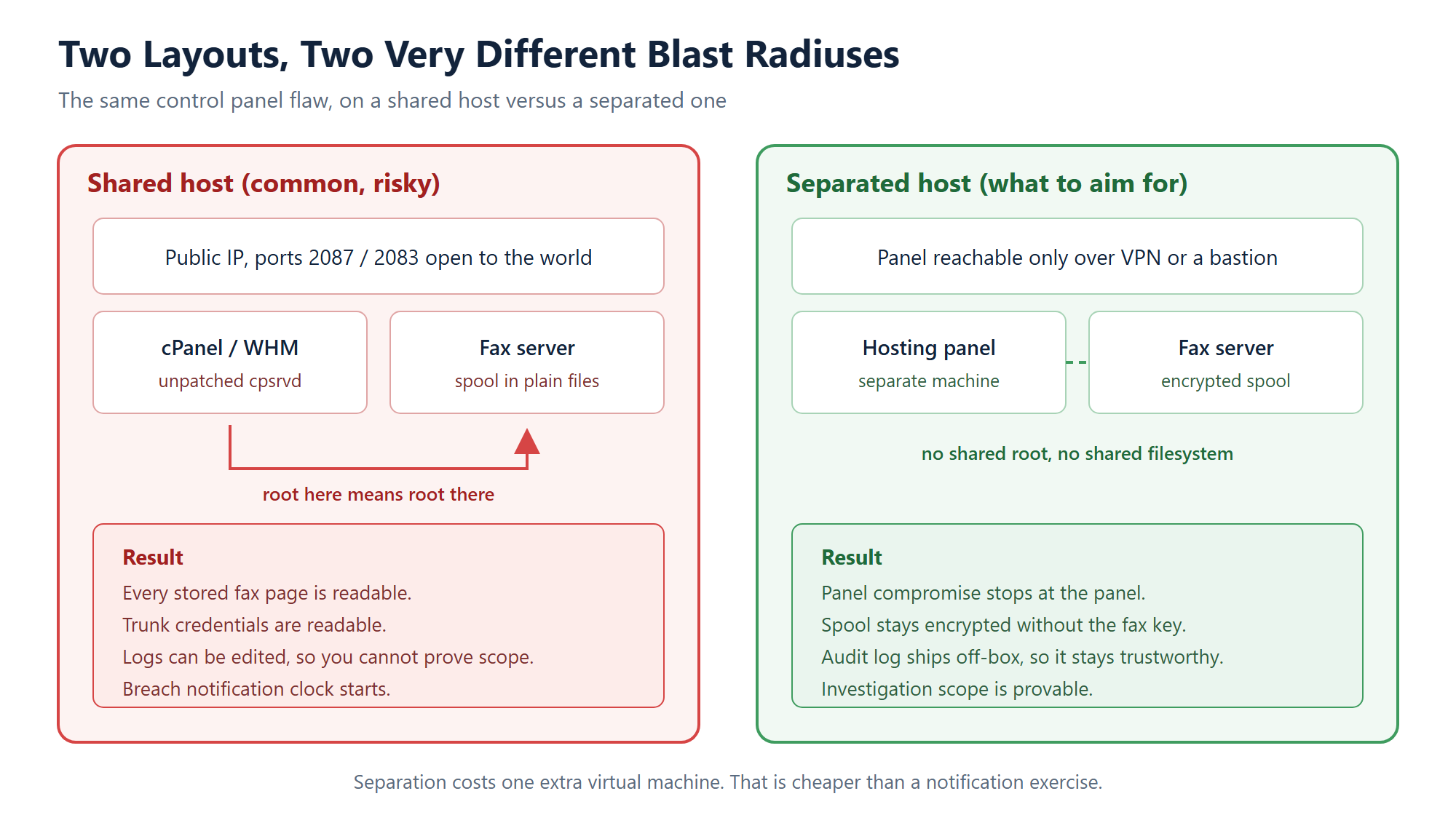
In practice that means the fax server gets its own machine or its own virtual machine, the hosting panel gets a different one, and the panel is reachable over a VPN or a bastion rather than the open internet. Encrypt the spool at rest and ship the audit log somewhere the fax host cannot rewrite. That last detail is underrated. An audit trail stored on the machine being investigated is not really an audit trail.
Is one extra virtual machine worth it? For a hobby setup, probably not. For anything carrying patient documents, the extra machine costs less per year than a single breach notification exercise costs in staff time alone. Our installation guide assumes a dedicated host for exactly this reason, and the technology stack behind ICTFax is built to run without a hosting panel anywhere near it.
One more thing worth saying plainly: if you inherited a server and have never audited what else runs on it, do that before you worry about tuning anything. Most fax hosts I have seen accumulate services nobody remembers installing.
Frequently asked questions
Does CVE-2026-41940 affect ICTFax itself?
No. The vulnerability is in cPanel and WHM, not in the fax software. It matters to fax operators only because the two so often share a server, and root on that server means read access to the fax spool.
How do I know if my server was already compromised?
Look for authenticated WHM sessions with no corresponding login event, unfamiliar administrative users or API tokens, and changes to the panel configuration you did not make. Exploitation predates the patch by about two months, so a clean current version does not rule out earlier access.
Is a self-hosted fax server less safe than a cloud fax service?
Not inherently, but the responsibility sits with you. A cloud provider patches its own control plane while you accept that your documents live on someone else’s disks. Self-hosting reverses both halves of that trade. Neither option removes risk, so pick the one whose failure mode you can actually manage.
Should I remove the hosting panel from my fax server?
If the server exists to run fax, yes. A fax host needs a mail transfer agent, a SIP stack and the fax application. It does not need a graphical hosting panel, and every panel you remove is an attack surface you stop having to patch.
What should I rotate after patching?
SIP and trunk credentials first, since they sit in readable configuration files. Then panel passwords, API tokens, and any credentials stored in cron jobs or deployment scripts on the same box.
Related resources
- ICTFax installation guide
- Open source faxing software based on the T.38 protocol
- ICTFax administrator guide
- Download ICTFax
- ICTFax support
Running fax on hardware you control is still the right call for anyone handling sensitive documents. Just make sure the machine underneath it is doing one job. Download ICTFax and follow the installation guide for a clean, panel-free build.